How to Import a ChatGPT Workout Plan Into a Real Tracking App
Get the exact ChatGPT prompt and step-by-step process to import any AI-generated workout plan into RepBro's tracking system for proper logging and progression.
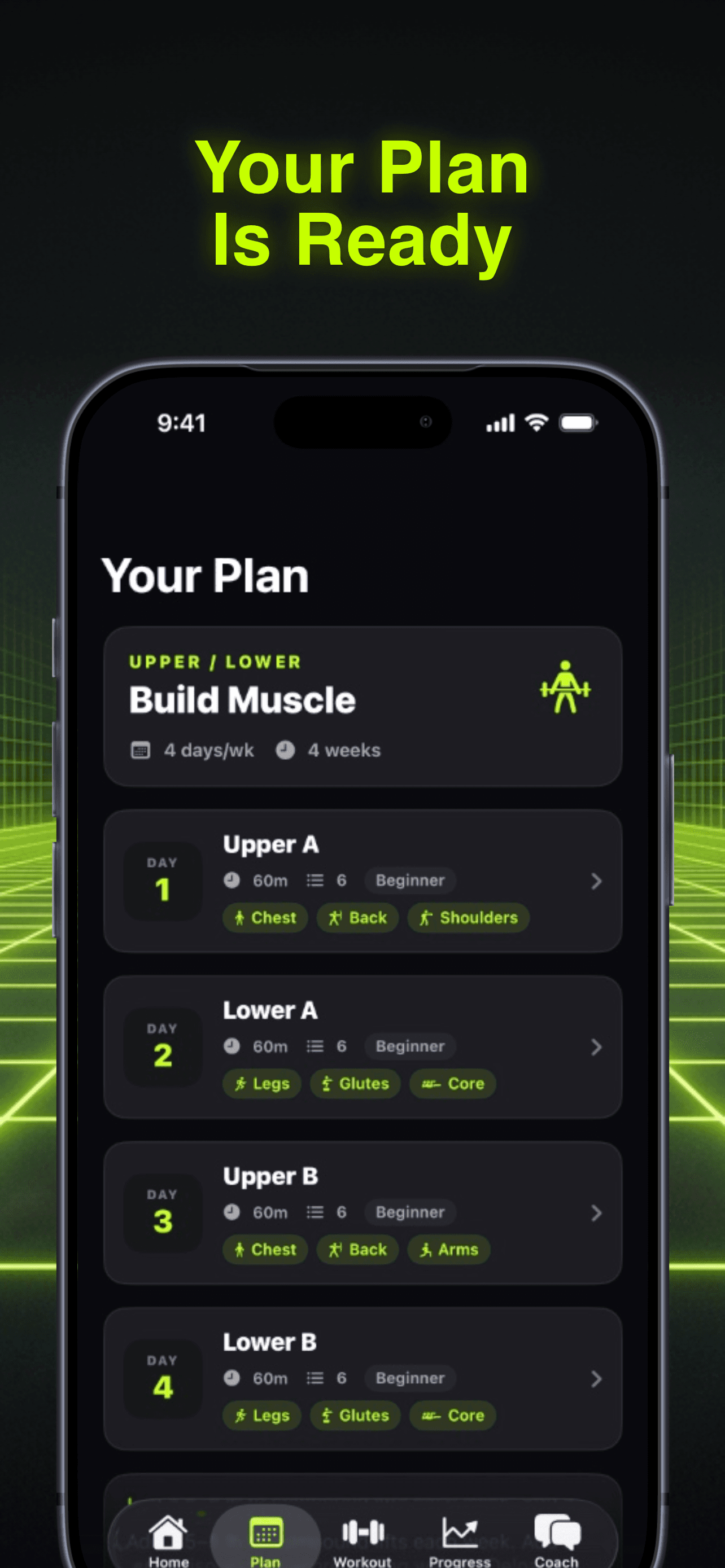
Photo by RepBro.
ChatGPT can generate solid workout plans in seconds. But here's the problem: you need somewhere to actually track your sets, reps, and weights. That's where a proper tracking app comes in.
To import a ChatGPT workout plan into RepBro: Use our specific prompt to get properly formatted output, then paste it directly into RepBro's import feature. The app automatically converts AI text into trackable workouts with set logging, RPE tracking, and progression built in.
Most lifters make the mistake of keeping their AI-generated plan in a notes app or screenshot. You lose all the benefits of proper tracking, progressive overload, and performance analysis. Here's how to do it right.
The Perfect ChatGPT Workout Plan Prompt
Copy this prompt exactly. It's designed to output plans in the format RepBro expects:
Create a [X]-day workout split for [your goal: muscle building/strength/fat loss]. Include:

- Workout names (e.g., "Push Day A", "Upper Body")
- Exercise names (use standard names like "Barbell Bench Press", not "chest press")
- Sets and rep ranges (e.g., "3 sets of 8-12 reps")
- Rest periods between sets
- Any tempo or technique cues

Format as:
**Workout Name**
- Exercise: Sets x Reps, Rest: X minutes
- Exercise: Sets x Reps, Rest: X minutes

My details: [age, experience level, available equipment, any injuries/limitations]
Replace the bracketed sections with your specifics. For example: "Create a 4-day upper/lower split for muscle building. My details: 28 years old, 2 years lifting experience, full gym access, previous shoulder impingement."
Why Standard Exercise Names Matter
ChatGPT sometimes invents creative exercise names. "Incline chest destroyer" won't match RepBro's exercise database. Stick to standard names:
- Good: Barbell Bench Press, Romanian Deadlift, Lat Pulldown
- Avoid: Chest blaster, hammy destroyer, back shredder
If ChatGPT suggests an unusual name, ask it: "Replace [exercise name] with the standard gym name for this movement."
Step-by-Step Import Process
Step 1: Generate your plan using the prompt above. Copy the entire output.
Step 2: Open RepBro and tap the import button on the home screen.
Step 3: Paste your ChatGPT output directly into the import field.
Step 4: Review the parsed workout. RepBro automatically matches exercises to its database and sets up your tracking structure.
Step 5: Make any needed adjustments. Swap exercises if needed using RepBro's one-tap replacement feature.
The import happens instantly. Your ChatGPT plan becomes a fully trackable program with set logging, weight progression, and RPE tracking.
What Happens After Import
Once imported, RepBro treats your ChatGPT workout plan like any other program:
- Set-by-set logging: Track every rep, weight, and RPE
- Auto-progression: The app suggests weight increases based on your performance
- Exercise swaps: One-tap replacements that respect your muscle targets
- AI coaching: Ask questions about form, programming, or modifications mid-workout
Your AI-generated plan becomes a living, breathing program that adapts to your progress.
Common Import Issues and Fixes
Problem: Exercise doesn't match RepBro's database Fix: Use the exercise swap feature to find the closest match
Problem: Rep ranges are too vague ("8-12 reps") Fix: Pick a specific target (like 10 reps) for consistent tracking
Problem: ChatGPT included warm-up sets Fix: Delete these during import - RepBro has built-in warm-up suggestions
Problem: No rest periods specified Fix: Add 60-90 seconds for isolation moves, 2-3 minutes for compounds
Making Your Imported Plan Better
ChatGPT gives you a starting point. RepBro makes it smarter:
- Progressive overload: The app tracks when you hit your rep targets and suggests weight increases
- Fatigue management: RPE logging helps you auto-regulate intensity
- Weak point analysis: Progress tracking identifies lagging muscle groups
- Real-time coaching: Ask the AI coach for form cues or exercise modifications during your workout
Your imported plan evolves based on your actual gym performance, not just the original ChatGPT output.
Beyond the Basic Import
Once you're comfortable with importing ChatGPT plans, try these advanced techniques:
Periodization prompts: Ask ChatGPT to create 4-week mesocycles with different rep ranges and intensities.
Specialization blocks: Generate 6-week plans that focus on specific muscle groups or lifts.
Deload planning: Import recovery weeks that maintain movement patterns while reducing volume.
RepBro's import feature handles all these variations. The more specific your ChatGPT prompt, the better your imported program.
The Real Advantage
Here's what most people miss: ChatGPT creates the plan, but RepBro creates the results. The AI gives you programming. The tracking app gives you progression.
Without proper logging, your ChatGPT workout plan is just text. With RepBro's tracking, it becomes a data-driven system that adapts to your progress and keeps you moving toward your goals.
Import your next ChatGPT workout plan and experience the difference between having a program and following a system.
Frequently asked questions
- Can I import any ChatGPT workout plan into RepBro?
- Yes, RepBro can parse most ChatGPT workout plans. Use standard exercise names and clear set/rep formatting for best results. The import feature automatically matches exercises to the database.
- What if ChatGPT suggests an exercise RepBro doesn't recognize?
- Use RepBro's one-tap exercise swap feature to find a similar movement. The app suggests alternatives that target the same muscles and work with your available equipment.
- Do I need to modify the ChatGPT prompt for different goals?
- Yes, specify your goal (muscle building, strength, fat loss) and experience level in the prompt. This helps ChatGPT generate more appropriate rep ranges and exercise selection.
- How does RepBro improve on a basic ChatGPT workout plan?
- RepBro adds progressive overload tracking, RPE logging, auto-regulation, and real-time AI coaching. Your static ChatGPT plan becomes an adaptive system that responds to your progress.
- Can I import multiple ChatGPT plans or switch between them?
- Yes, you can import and save multiple workout plans in RepBro. Switch between them based on your current goals or training phase.