How to Import a ChatGPT Workout Plan Into an App That Actually Tracks Progress
Turn your ChatGPT workout plan into trackable sets and reps. Learn how to import AI-generated plans into RepBro for proper logging, progression tracking, and real coaching.
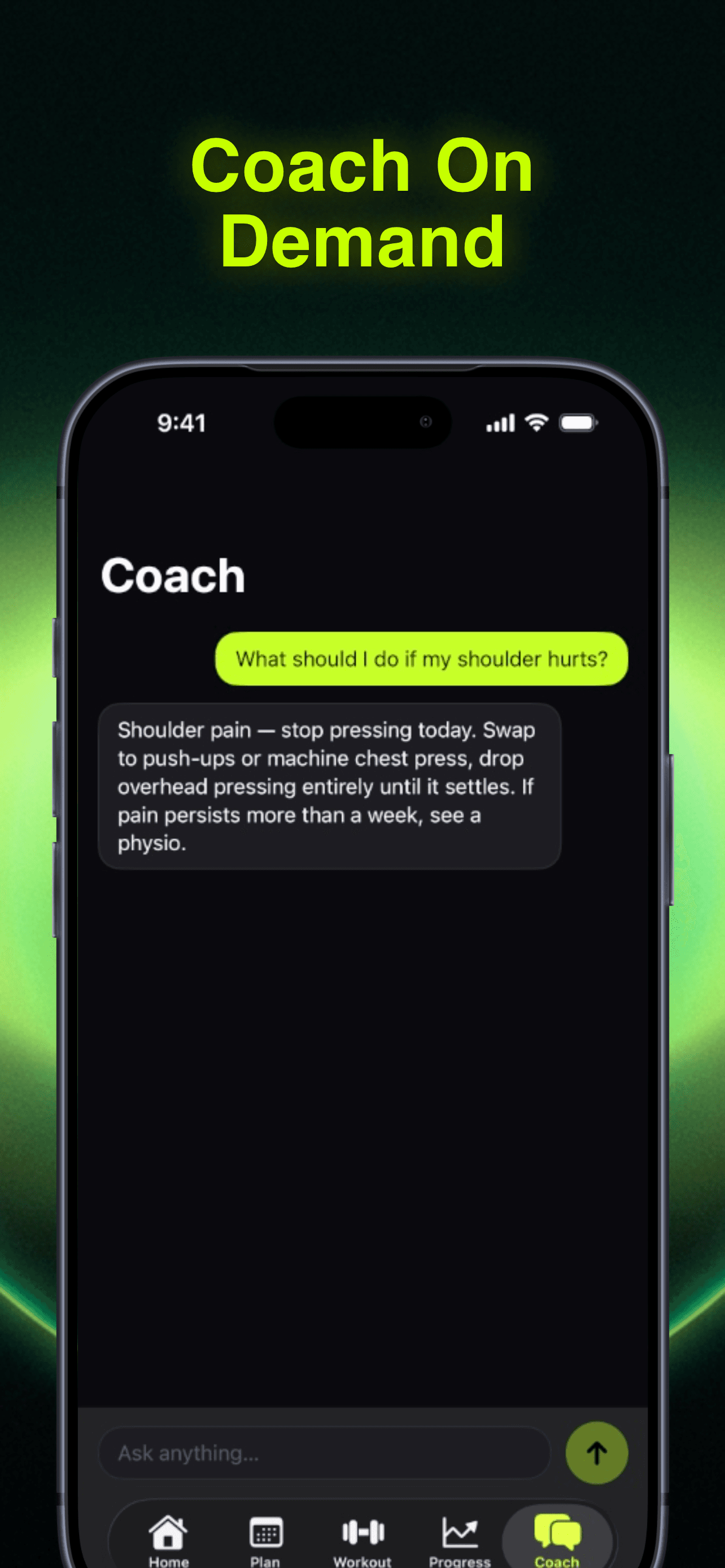
Photo by RepBro.
You asked ChatGPT for a workout plan. It gave you a wall of text with exercises, sets, and reps. Now what?
Most lifters hit the same roadblock: ChatGPT creates decent programming on paper, but you need an actual tracking system to log weights, monitor progression, and adjust loads week to week. Importing a ChatGPT plan into an app means converting that text into trackable sets and reps with proper progression tracking. The key is finding an app that can handle AI-generated plans and adapt them as you get stronger.
Here's how to turn your ChatGPT workout plan into something you can actually use in the gym.
Why ChatGPT Plans Need a Tracking App
ChatGPT excels at creating structured workout templates. It understands periodization, muscle groups, and basic programming principles. But it can't track your actual performance or adjust weights based on your RPE feedback.
The gap is execution. ChatGPT gives you "Bench Press 3x8-10" but doesn't know if you hit 185 for 8 reps at RPE 9 last week. It can't tell you to bump the weight to 190 or drop to 180 based on how the sets felt.
A proper tracking app bridges this gap by logging your actual performance and suggesting progression adjustments.
Step 1: Extract the Core Structure
Don't copy-paste the entire ChatGPT response. Instead, pull out the essential elements:
- Exercise selection (Squat, Bench, Deadlift, etc.)
- Set and rep ranges (3x8-10, 4x6, etc.)
- Training frequency (Upper/Lower 4x/week, Push/Pull/Legs, etc.)
- Progression scheme (linear, double progression, etc.)
Skip the motivational fluff and exercise descriptions. You need the skeleton, not the essay.
Most ChatGPT plans follow predictable patterns: compound movements first, isolation work second, 3-4 sets per exercise, 6-12 rep ranges for hypertrophy or 3-6 for strength.
Step 2: Choose an App That Handles Custom Plans
Not every fitness app can import custom programming. Many force you into their pre-built templates.
Look for apps that offer:
- Custom exercise library or the ability to add exercises
- Flexible set/rep programming (not just 3x10 for everything)
- RPE or load progression tracking
- Exercise substitution when equipment isn't available
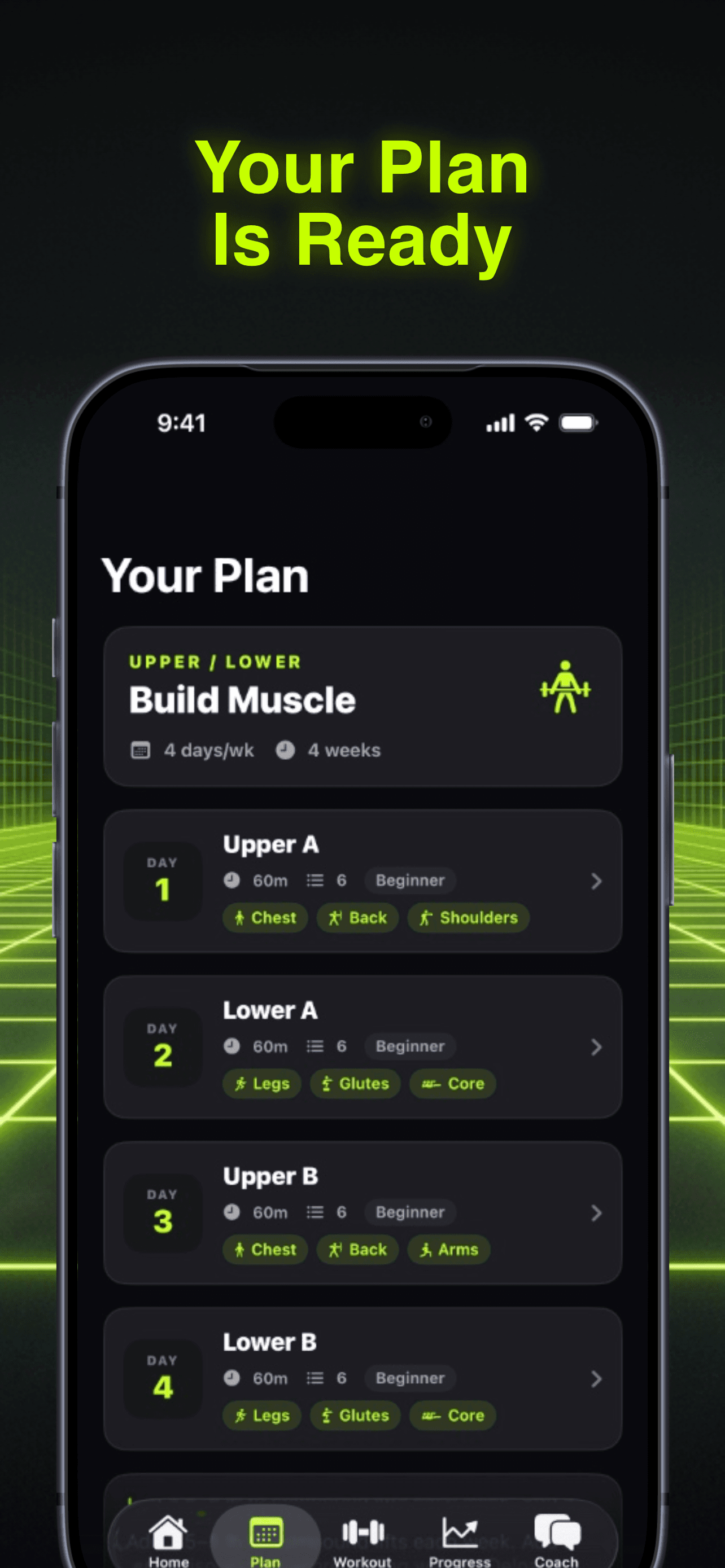
RepBro handles this by letting you describe your equipment and goals during setup, then generating a personalized plan. But you can also modify exercises, swap movements, and ask the AI coach to adapt ChatGPT's programming to your specific situation.
How to Import Your Plan Into RepBro
RepBro's approach is different. Instead of manually entering every exercise, you describe your ChatGPT plan to the AI coach during onboarding or through the chat feature.
Here's the process:
- Start the 90-second setup with your training goals and available equipment
- Let RepBro generate an initial plan based on your preferences
- Use the AI coach chat to modify the plan with ChatGPT's specific exercises or structure
- Ask for substitutions if ChatGPT recommended exercises you can't perform
For example, if ChatGPT gave you a 5-day split but you only have 3 days, tell RepBro's coach: "Modify this to 3 days per week but keep the same exercise selection." The AI understands programming principles and can compress or expand routines while maintaining balance.
Step 3: Handle Exercise Substitutions
ChatGPT often suggests exercises you can't do. Maybe it recommends cable lateral raises but your home gym only has dumbbells. Or it programs Romanian deadlifts but your gym's bars are all being used.
This is where RepBro's one-tap exercise swaps shine. The app knows your equipment limitations and can suggest alternatives that target the same muscles with similar movement patterns.
The AI coach also understands substitution principles:
- Same muscle group: Lat pulldowns for pull-ups
- Similar movement pattern: Dumbbell press for barbell press
- Equipment constraints: Resistance band rows for cable rows
Step 4: Track and Adjust Week to Week
The real value comes from progression tracking. ChatGPT can't see that you hit your target reps easily last week and should increase the weight.
RepBro logs every set with weight, reps, and RPE. The AI coach uses this data to suggest load increases, deload weeks, or exercise modifications based on your actual performance patterns.
If ChatGPT's original plan called for 3x8-10 but you're consistently hitting 10+ reps at RPE 7, the app will recommend bumping the weight. If you're struggling to hit the lower end of the rep range, it suggests backing off or checking your form.
Common Import Challenges and Solutions
Challenge: ChatGPT uses exercise names you don't recognize Solution: Ask RepBro's AI coach to identify similar exercises in its database
Challenge: The rep ranges don't match your goals Solution: Modify the ranges during import (ChatGPT's 12-15 rep sets become 8-12 for strength focus)
Challenge: The plan assumes equipment you don't have Solution: Use RepBro's equipment filter to auto-substitute compatible exercises
Challenge: ChatGPT's progression scheme is unclear Solution: Let RepBro handle progression automatically based on your logged performance
Why This Beats Manual Tracking
Importing a ChatGPT plan into a smart app gives you the best of both worlds: AI-generated programming structure with intelligent execution tracking.
You get ChatGPT's programming knowledge without the execution gaps. The app handles the tedious parts (logging weights, calculating progression, tracking volume) while you focus on lifting.
Manual tracking with pen and paper or basic apps loses the adaptive element. You're stuck guessing whether to increase weight or reps based on feel alone.
Ready to turn your ChatGPT workout plan into something you can actually track and progress with? RepBro's AI coach can adapt any programming to your equipment and goals, then guide you through every workout with personalized coaching.
Frequently asked questions
- Can I directly copy-paste a ChatGPT workout plan into RepBro?
- Not directly, but RepBro's AI coach can adapt ChatGPT's programming during setup or through the chat feature. Describe the plan structure and exercises, and the coach will modify RepBro's programming to match your ChatGPT plan while ensuring proper tracking and progression.
- What if ChatGPT recommended exercises I can't do at my gym?
- RepBro's one-tap exercise swap feature suggests alternatives based on your available equipment. The AI coach understands substitution principles and can replace any exercise with one that targets the same muscles using your available equipment.
- How does RepBro handle progression if I import a ChatGPT plan?
- RepBro tracks your actual performance (weight, reps, RPE) and suggests progression adjustments based on your logged data. If ChatGPT's plan says 3x8-10 but you're consistently hitting 10+ reps easily, RepBro will recommend increasing the weight.
- Can RepBro modify ChatGPT's training frequency?
- Yes, RepBro's AI coach can compress or expand ChatGPT's programming to fit your schedule. If ChatGPT gave you a 5-day plan but you only have 3 days available, the coach can redistribute the exercises while maintaining muscle group balance.
- Is it better to use ChatGPT's plan or RepBro's generated plan?
- RepBro's generated plans are designed specifically for app-based tracking and progression. However, you can get the best of both by using RepBro's AI coach to adapt ChatGPT's exercise selection or structure to your preferences while keeping RepBro's intelligent tracking and progression features.